SHT 01 / 05 — ARRIVAL
Every PDF tool.
Engineered for your browser.
Merge, split, compress, sign, OCR, protect and convert PDF files — seventeen precision instruments that run entirely on your device. No uploads. No accounts. No limits.
REF A — DOCUMENT.PDF · PROCESSED 100% CLIENT-SIDE
SHT 02 / 05 — DECONSTRUCTION
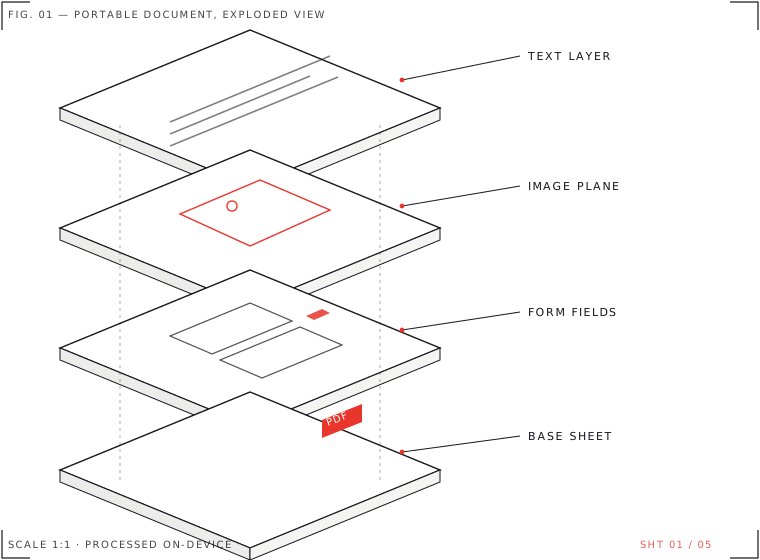
Anatomy of a document.
A PDF is layers of engineering — and every layer here is yours to edit.
- TEXT LAYER — edit · recognize
- IMAGE PLANE — extract · compress
- FORM FIELDS — fill & flatten
- SIGNATURE — draw · type · upload
- METADATA — title, author, page tree
SHT 03 / 05 — INSTRUMENTS
Merge
Two documents in. One document out. Order preserved to the page.
OPEN TOOL → 02Split
Separate at any boundary. Extract exactly the pages specified.
OPEN TOOL → 03Compress
Re-engineered encoding. Same document, a fraction of the bytes.
OPEN TOOL → 04OCR
Scanned pixels become searchable text. Eleven languages. No page caps.
OPEN TOOL → 05Protect
AES-256 encryption applied on your machine. The password never travels.
OPEN TOOL →SHT 04 / 05 — SPECIFICATION
3 tasks per hourUploads to serversAccount requiredWatermarked outputPremium page limits
On your device.
Unlimited. Always.
SHT 05 / 05 — INDEX OF INSTRUMENTS
All tools
Free, unlimited, in your browser. Your files never leave your device.
ORGANIZE
Merge PDFCombine files into one Split PDFExtract or separate pages Organize PDFReorder, duplicate, insert Rotate PDFAny page, any angle Page NumbersIncl. Bates numberingCONVERT & OPTIMIZE
JPG to PDFImages become pages PDF to ImagePages become JPG/PNG PDF to WordEditable documents OCR PDFMake scans searchable Compress PDFShrink file sizeFrequently asked questions
Is MyFreePDFEdit really free?
Yes. Every tool is free with no signup, no watermark, and no file count limits. We support the site through unobtrusive ads.
Are my files uploaded to a server?
For most tools — merge, split, compress, sign, annotate, rotate, OCR, protect — your files are processed entirely in your browser and never leave your device. A small number of conversion tools may use server processing; we always say so on the tool page.
Is there a file size limit?
There's no hard limit, but very large files (over 500 MB) may be slow depending on your device. For best results we recommend files under 200 MB.
Does it work on mobile?
Yes. The site is fully responsive and works on iPhone, iPad and Android devices.
Do I need to install anything?
No. MyFreePDFEdit runs in any modern browser — Chrome, Safari, Firefox, Edge. Nothing to install or download.